Partition Evolution: Change Your Partitioning Without Rewriting Data
This is Part 4 of a 15-part Apache Iceberg Masterclass. Part 3 covered metadata-driven performance. This article explains how Iceberg handles the problem that has plagued data lakes for over a decade: what happens when your partition strategy needs to change.
Partitioning determines how data is physically organized in storage, and it is the single most impactful factor for query performance on large tables. Get it right and queries skip 95% of the data. Get it wrong and every query scans everything. The problem is that requirements change, data volumes grow, and the partition strategy that worked last year becomes a bottleneck this year.
Table of Contents
- What Are Table Formats and Why Were They Needed?
- The Metadata Structure of Current Table Formats
- Performance and Apache Iceberg's Metadata
- Technical Deep Dive on Partition Evolution
- Technical Deep Dive on Hidden Partitioning
- Writing to an Apache Iceberg Table
- What Are Lakehouse Catalogs?
- Embedded Catalogs: S3 Tables and MinIO AI Stor
- How Iceberg Table Storage Degrades Over Time
- Maintaining Apache Iceberg Tables
- Apache Iceberg Metadata Tables
- Using Iceberg with Python and MPP Engines
- Streaming Data into Apache Iceberg Tables
- Hands-On with Iceberg Using Dremio Cloud
- Migrating to Apache Iceberg
The Hive Problem: Partitioning Is Permanent
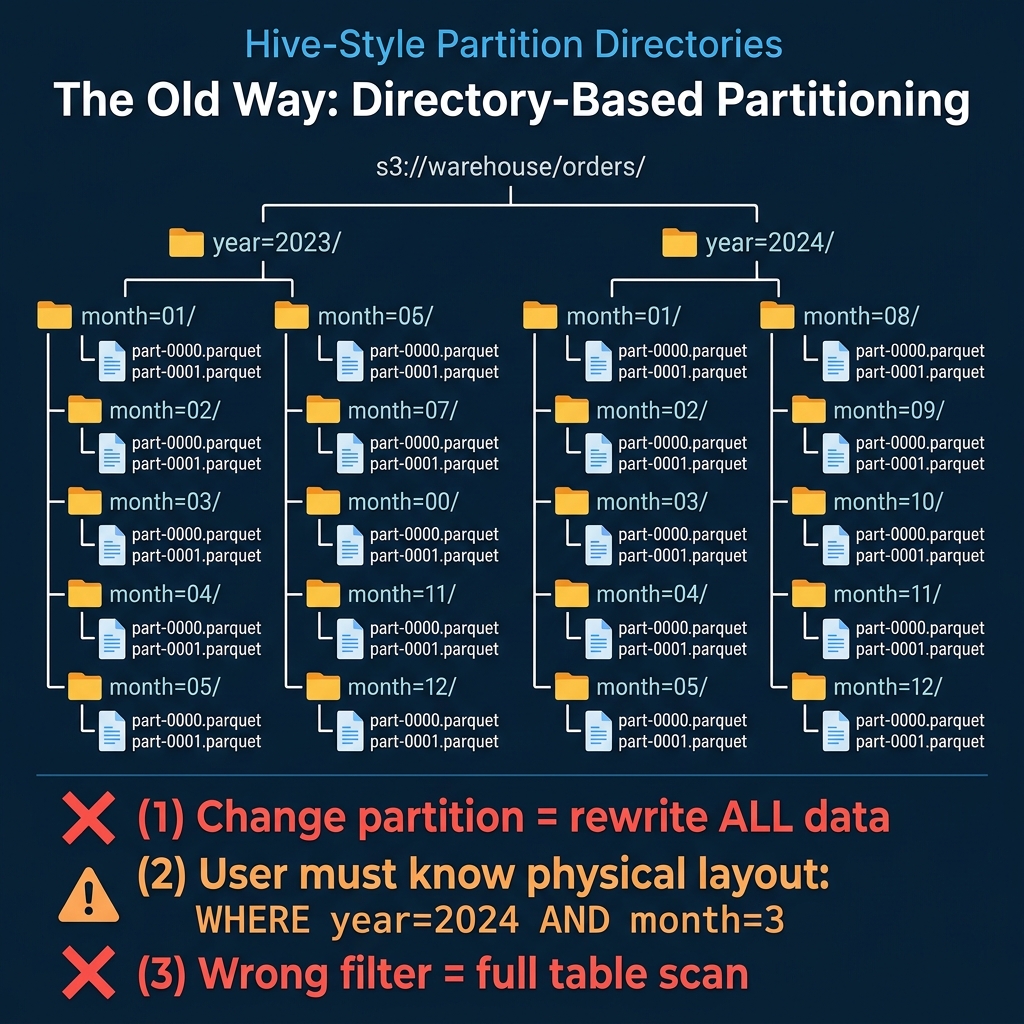
In Hive and other traditional data lake systems, partitions are physical directories. A table partitioned by year and month has a directory structure like:
s3://warehouse/orders/year=2023/month=01/part-0000.parquet
s3://warehouse/orders/year=2023/month=02/part-0000.parquet
...
This design has three fundamental problems:
Changing partitions requires rewriting all data. If a table is partitioned by month and you need daily partitions (because data volume grew and monthly partitions are now too large for efficient queries), you must read every file, re-partition it, and write it back. For a petabyte table, this means a petabyte of compute and I/O, hours of processing, and downtime for consumers.
Users must know the physical layout. Queries must explicitly reference partition columns using the exact partition column names: WHERE year = 2024 AND month = 3. If a user writes WHERE order_date = '2024-03-15', Hive does not recognize that order_date maps to year = 2024, month = 3, and it scans the entire table. This creates a constant burden on users to understand and correctly use the physical layout.
Wrong filters produce silent full scans. There is no error, no warning. The query runs, it just reads every partition. Teams discover the problem only when they notice query times are 50x slower than expected.
How Iceberg Solves This
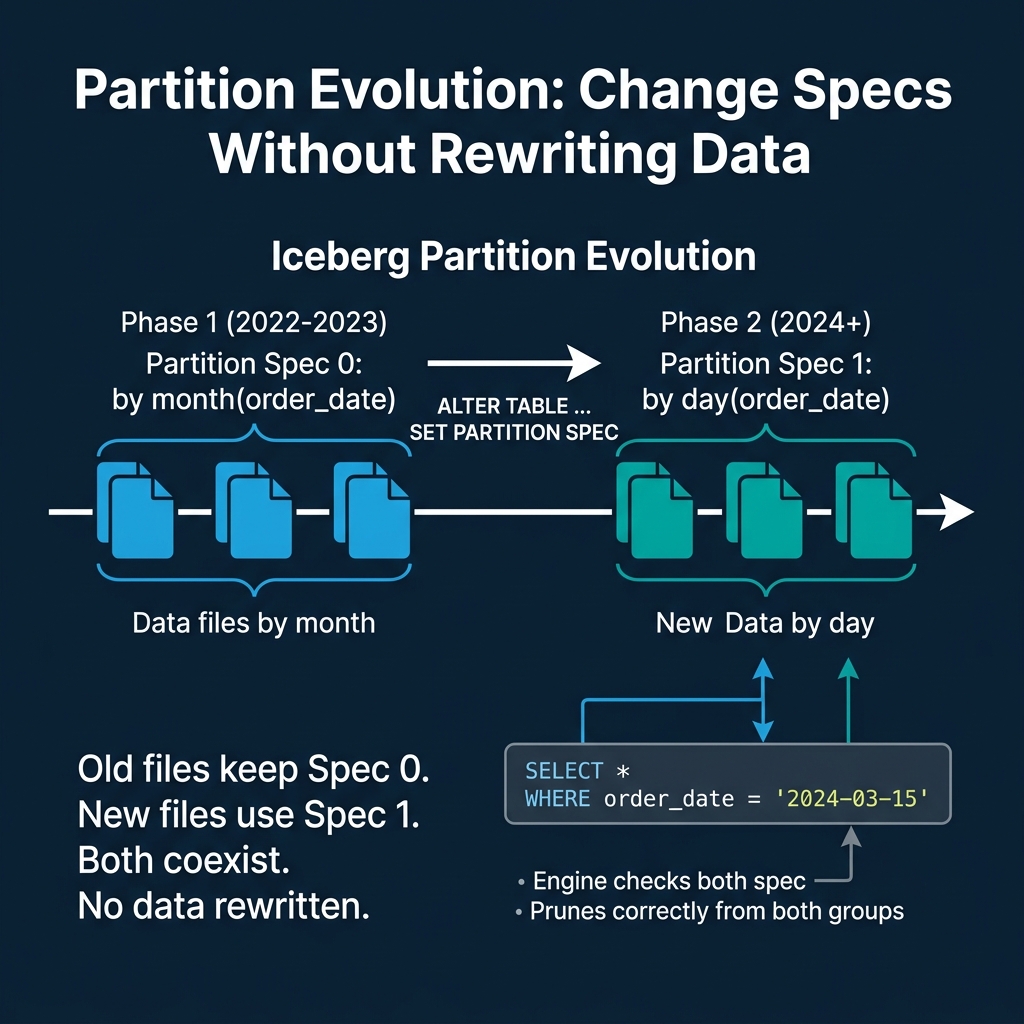
Iceberg separates the logical partition specification from the physical data layout through two mechanisms: hidden partitioning (covered in Part 5) and partition evolution.
The Partition Spec
Every Iceberg table has a partition spec that defines how source columns map to partition values. The spec does not create directories. Instead, it records partition values as metadata in manifest entries alongside each data file.
-- Create a table partitioned by month
CREATE TABLE orders (
  order_id BIGINT,
  order_date DATE,
  amount DECIMAL(10,2),
  status STRING
) PARTITIONED BY (month(order_date))
When data is written, the engine computes the partition value (month('2024-03-15') = 2024-03) and stores it in the manifest entry for that file. The file itself can live at any path; there is no requirement for a month=2024-03/ directory.
Evolving the Spec
When data volume grows and monthly partitions become too coarse, you change the spec:
ALTER TABLE orders SET PARTITION SPEC (day(order_date))This is a metadata-only operation. It takes milliseconds. No data is read or rewritten. What happens internally:
- The current partition spec (Spec 0:
month(order_date)) is preserved in the table's metadata history. - A new partition spec (Spec 1:
day(order_date)) is set as the active spec. - All existing data files retain their Spec 0 partition values in their manifest entries.
- All new data written to the table uses Spec 1.
The table now contains files with two different partition specs. This is not a broken state. It is the designed behavior.
How Query Planning Handles Multiple Specs
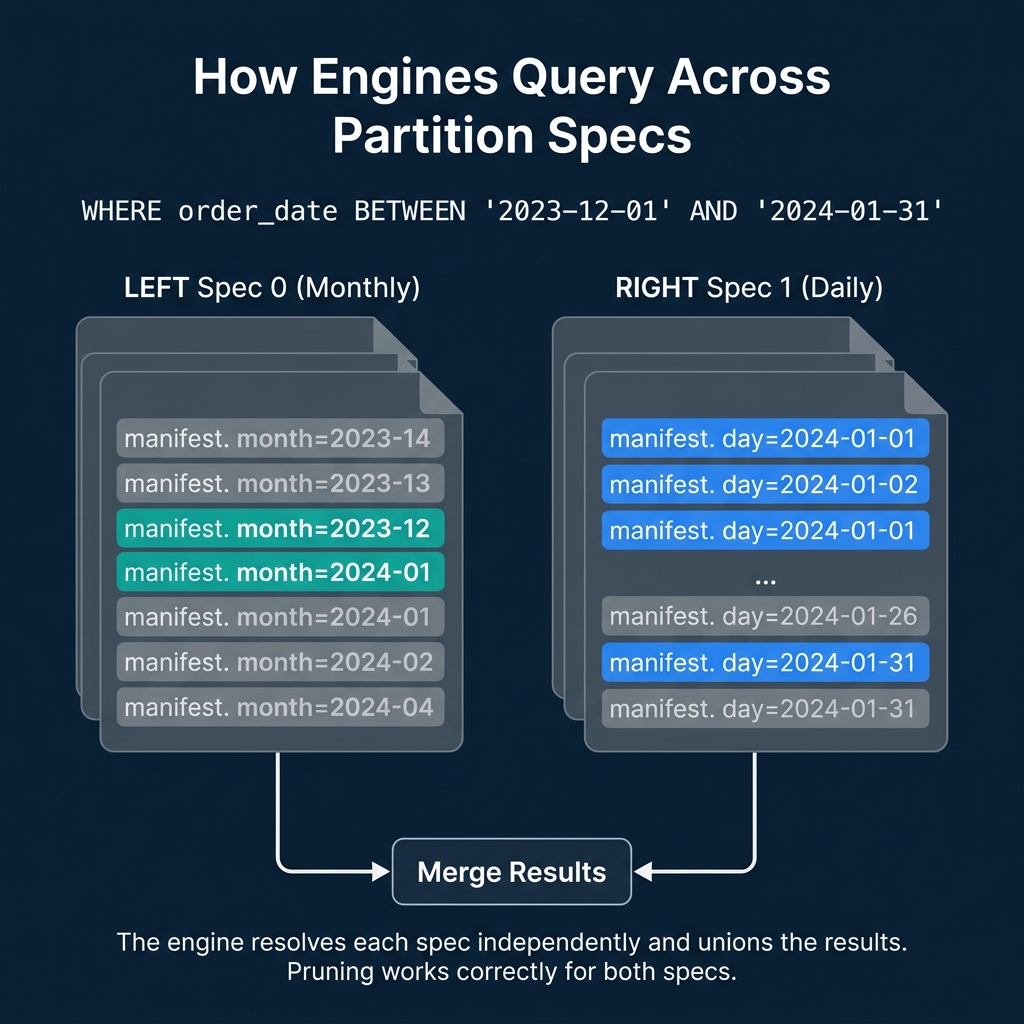
When a query filters on order_date, the engine must correctly prune files regardless of which spec they were written under. Here is the process:
SELECT * FROM orders
WHERE order_date BETWEEN '2023-12-01' AND '2024-01-31'
For Spec 0 files (monthly): The engine translates the date range into month values: 2023-12 and 2024-01. It checks manifest entries with Spec 0 partition values and keeps files where the month partition is either 2023-12 or 2024-01. All other months are skipped.
For Spec 1 files (daily): The engine translates the date range into day values: 2024-01-01 through 2024-01-31. It checks manifest entries with Spec 1 partition values and keeps files where the day partition falls within that range. All other days are skipped.
Result: Both old and new files are correctly pruned using their respective specs. The query returns accurate results from files written under different partition strategies, without the user knowing or caring about the spec history.
Real-World Scenarios
Growing From Monthly to Daily
The most common evolution. A startup begins with monthly partitions when data volume is 10 GB/month. Two years later, data volume is 500 GB/month and monthly partitions produce files too large for efficient processing. Evolving to daily partitions makes new data more granular while old data remains accessible.
Adding a Partition Column
A table partitioned only by date starts receiving queries that heavily filter by region. Adding a partition on region (using bucket(16, region)) improves pruning for those queries:
ALTER TABLE orders SET PARTITION SPEC (day(order_date), bucket(16, region))Old files remain partitioned by date only. New files are partitioned by both date and region. Queries that filter on date work correctly for both old and new files. Queries that filter on region get pruning benefits only for new files.
Removing a Partition Column
If a partition column becomes irrelevant (e.g., a geographic region is no longer used for filtering), you can evolve the spec to remove it. Old files keep their partition values, but new files are no longer organized by that column. Dremio and other engines handle this transparently during query planning.
What About the Old Data?
After a partition evolution, old data continues to work correctly but may have suboptimal organization. The old monthly files are coarser than the new daily files, meaning queries against historical data scan larger files than necessary.
Two options:
Leave it alone. If historical data is queried infrequently, the cost of less-optimal pruning is minimal. This is the zero-effort approach.
Compact old data. Run a compaction job that rewrites old files under the new spec. This produces daily-partitioned files for the historical data too, but requires compute resources. Dremio's automatic table optimization can handle this for tables managed by Open Catalog.
How Other Formats Handle This
| Format | Partition Change Approach | Data Rewrite? | Multiple Specs? |
|---|---|---|---|
| Iceberg | Metadata-only spec evolution | No | Yes, coexist |
| Delta Lake | Liquid Clustering (adaptive) | Background rewrite | N/A (clustering-based) |
| Hudi | Re-partition with full rewrite | Yes | No |
| Hive | Full table rewrite | Yes | No |
Delta Lake's Liquid Clustering is a different solution to the same problem. Instead of static partitions, it uses adaptive clustering that reorganizes data in the background. The tradeoff: Liquid Clustering requires ongoing background compute, while Iceberg's partition evolution is a one-time metadata operation with optional follow-up compaction.
Partition evolution is one of the features that makes Iceberg a safe long-term choice. It means the partitioning decision you make today is not permanent. Part 5 covers hidden partitioning, the other half of Iceberg's partitioning story.
Books to Go Deeper
- Architecting the Apache Iceberg Lakehouse by Alex Merced (Manning)
- Lakehouses with Apache Iceberg: Agentic Hands-on by Alex Merced
- Constructing Context: Semantics, Agents, and Embeddings by Alex Merced
- Apache Iceberg & Agentic AI: Connecting Structured Data by Alex Merced
- Open Source Lakehouse: Architecting Analytical Systems by Alex Merced