When Catalogs Are Embedded in Storage
This is Part 8 of a 15-part Apache Iceberg Masterclass. Part 7 covered the traditional catalog landscape. This article examines a newer approach: embedding the catalog directly inside the storage layer.
Traditional Iceberg architectures have three components: the query engine, a standalone catalog, and object storage. Embedded catalogs collapse the catalog into the storage layer itself, reducing the number of services to manage while providing built-in table maintenance.
Table of Contents
- What Are Table Formats and Why Were They Needed?
- The Metadata Structure of Current Table Formats
- Performance and Apache Iceberg's Metadata
- Technical Deep Dive on Partition Evolution
- Technical Deep Dive on Hidden Partitioning
- Writing to an Apache Iceberg Table
- What Are Lakehouse Catalogs?
- Embedded Catalogs: S3 Tables and MinIO AI Stor
- How Iceberg Table Storage Degrades Over Time
- Maintaining Apache Iceberg Tables
- Apache Iceberg Metadata Tables
- Using Iceberg with Python and MPP Engines
- Streaming Data into Apache Iceberg Tables
- Hands-On with Iceberg Using Dremio Cloud
- Migrating to Apache Iceberg
The Embedded Catalog Model
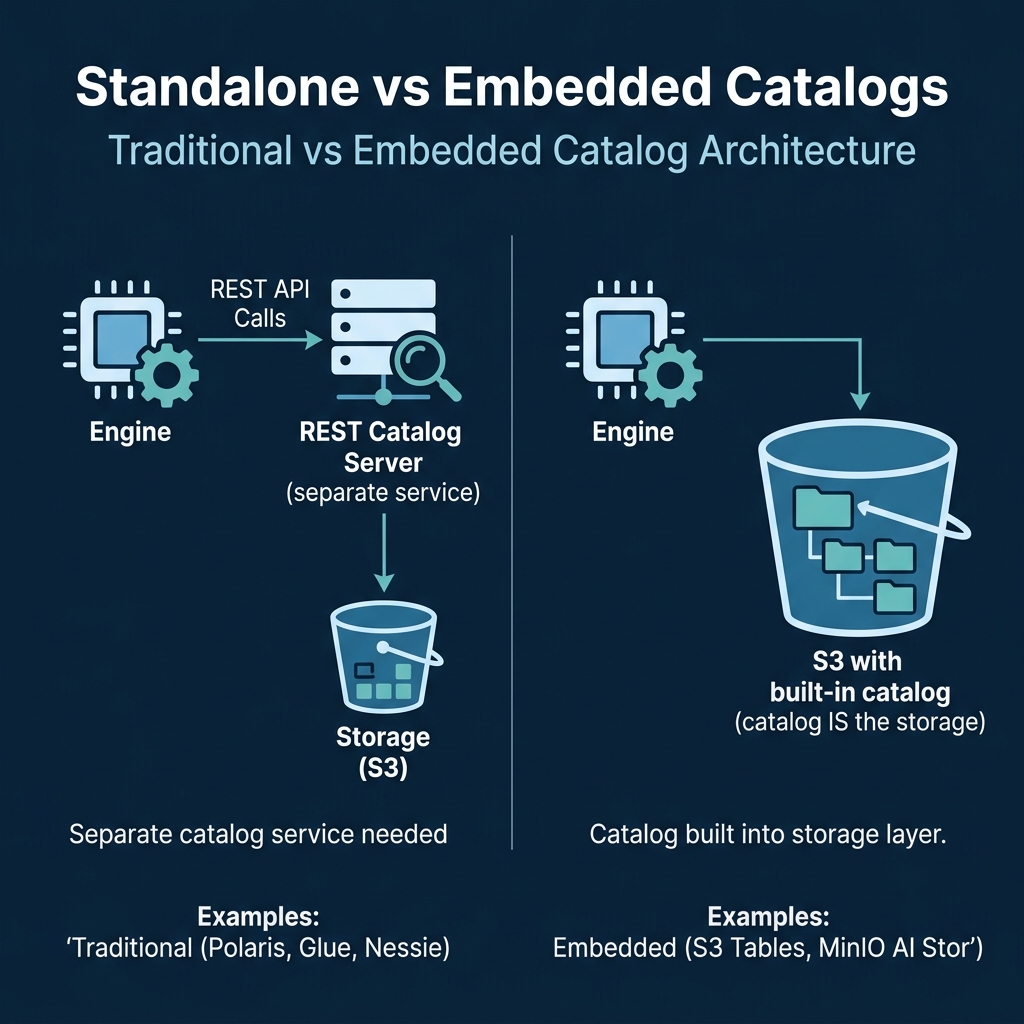
In a traditional setup, a separate catalog service (Polaris, Glue, Nessie) runs alongside object storage. The engine talks to the catalog to get metadata pointers, then reads data from storage. Two services, two sets of credentials, two operational concerns.
In an embedded model, the storage service itself manages Iceberg metadata. When you create a table, the storage system creates the metadata files internally and handles atomic commits, compaction, and snapshot management. The engine interacts with a single endpoint that serves both catalog operations and data access.
AWS S3 Tables
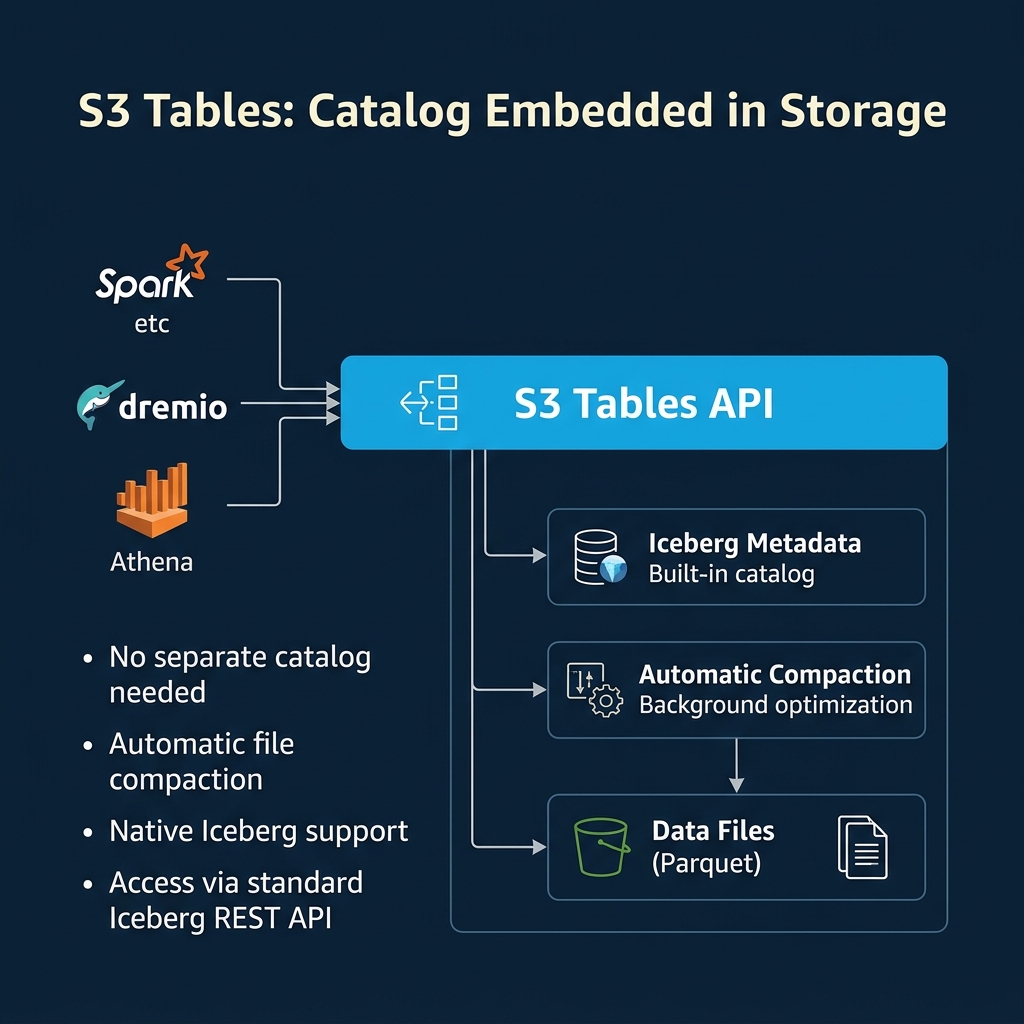
AWS launched S3 Tables in late 2024 as a new S3 bucket type designed specifically for Iceberg tables. When you create an S3 table bucket, AWS manages the Iceberg catalog internally.
How it works: You create tables through the S3 Tables API or through engines like Athena and EMR. S3 Tables stores the Iceberg metadata alongside the data in the same bucket, handling the catalog pointer, manifest management, and atomic commits behind the scenes.
Built-in maintenance: S3 Tables runs automatic compaction in the background, merging small files into optimally-sized ones without any user configuration. It also handles snapshot expiry and orphan file cleanup. This eliminates one of the biggest operational burdens of Iceberg (covered in Part 10).
Access via REST API: S3 Tables exposes tables through a REST-catalog-compatible interface. Dremio, Spark, Trino, and other engines that support the Iceberg REST catalog can connect to S3 Tables directly.
Built-in lifecycle management: Beyond compaction, S3 Tables handles the entire table maintenance lifecycle. Snapshot expiry happens automatically based on configurable retention policies. Orphan files are cleaned up without user intervention. For teams that do not want to manage maintenance schedules, this is a significant operational advantage.
Limitations: S3 Tables is AWS-only. Tables are stored exclusively in S3 and cannot be moved to other cloud providers without migration. Cross-engine governance is limited to what AWS IAM provides. If you need fine-grained access control beyond IAM policies (column-level masking, row-level filters), you need a standalone catalog layer on top.
Cost model: S3 Tables uses a different pricing model than standard S3. Storage and request costs are similar, but the built-in maintenance operations (compaction, expiry) are included in the service price. Compare this to running Spark compaction jobs on EMR, which adds compute costs on top of storage.
Table bucket vs. general-purpose bucket: S3 Tables uses a new "table bucket" type, separate from standard S3 buckets. You cannot mix table data with other objects in a table bucket, and standard S3 operations (ls, cp, rm) do not work on table bucket contents. All interaction goes through the S3 Tables API or through Iceberg-compatible engines.
MinIO AI Stor
MinIO AI Stor takes a similar approach for on-premises and private cloud deployments. MinIO, the leading S3-compatible object storage system, embeds Iceberg catalog functionality directly into the storage layer.
How it works: MinIO manages Iceberg table metadata as part of its storage operations. When data is written, MinIO handles the catalog updates, file tracking, and maintenance internally.
Key differentiator: MinIO is designed for on-premises deployments and private clouds, making it the embedded catalog option for organizations that cannot use public cloud services. It also integrates vector storage capabilities for AI workloads alongside Iceberg tables.
S3 compatibility: Because MinIO implements the S3 API, engines that work with S3 (Spark, Trino, Dremio) can interact with MinIO-managed Iceberg tables with minimal configuration changes. This makes it a drop-in replacement for S3 in on-premises environments.
GPU-accelerated analytics: MinIO AI Stor integrates with GPU-aware processing frameworks, enabling direct analytics on Iceberg data without moving it to a separate compute layer. This is relevant for organizations running AI/ML workloads alongside traditional analytics.
When Embedded Catalogs Make Sense
| Scenario | Recommendation |
|---|---|
| AWS-only, want minimal ops | S3 Tables |
| On-premises, private cloud | MinIO AI Stor |
| Multi-cloud portability needed | Standalone catalog (Dremio Open Catalog) |
| Cross-engine governance needed | Standalone catalog (Polaris) |
| Multiple storage systems | Standalone catalog |
| Single storage, simple setup | Embedded catalog |
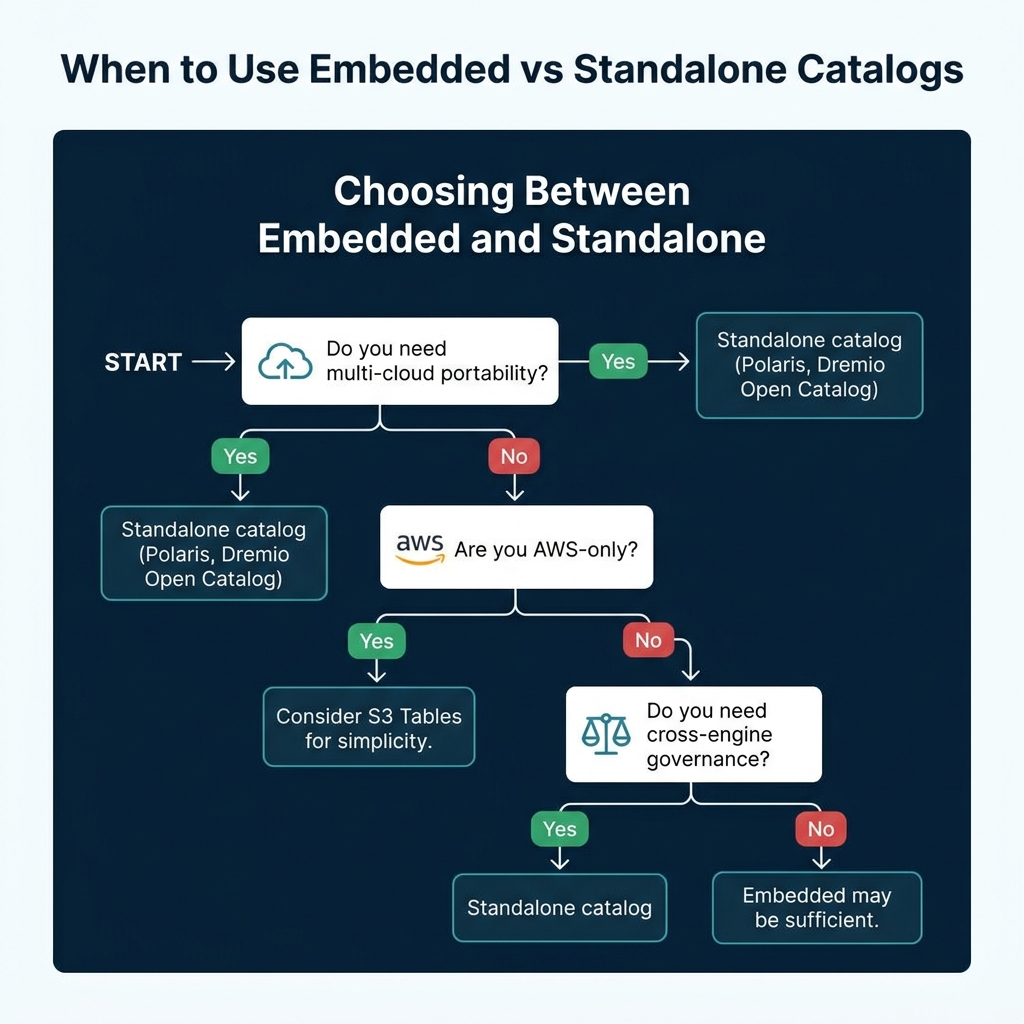
Embedded catalogs are the right choice when you have a single storage system and want to minimize operational complexity. They trade flexibility for simplicity.
Standalone catalogs remain the better choice when you need multi-cloud support, cross-engine governance, or the ability to query data across multiple storage systems through federation.
The Hybrid Approach
Many organizations use both. An embedded catalog handles the storage-managed tables (S3 Tables for their AWS data), while a standalone catalog like Dremio Open Catalog provides a unified view across all data sources. Dremio can connect to S3 Tables, AWS Glue tables, and standalone catalog tables simultaneously, presenting them all through a single semantic layer.
This hybrid approach lets you pick the simplest catalog for each use case while maintaining a unified analytics experience.
Operational Planning for Embedded Catalogs
When adopting an embedded catalog, plan for these considerations:
Vendor dependency: An embedded catalog ties your tables to the storage vendor's lifecycle. If the vendor changes pricing, deprecates features, or discontinues the product, migrating away requires converting all tables to a different catalog. With a standalone catalog, switching storage providers only requires changing the storage configuration.
Monitoring limitations: Embedded catalogs provide limited visibility into their internal maintenance operations. You cannot inspect the compaction schedule, tune the target file size, or monitor orphan cleanup progress as precisely as you can with manual maintenance via Spark procedures.
Cross-region access: Embedded catalogs are scoped to a storage region. If your analytics workloads run in a different region than your storage, the embedded catalog adds cross-region latency. A standalone catalog can be deployed in the same region as your compute for lower latency.
Integration testing: Before committing to an embedded catalog for production, test your full query stack (dashboards, notebooks, scheduled pipelines) against the embedded catalog endpoint. Verify that your engines handle the catalog's REST API implementation correctly, as there can be subtle differences between implementations.
Part 9 covers how table storage degrades over time and why maintenance matters regardless of which catalog you use.
Books to Go Deeper
- Architecting the Apache Iceberg Lakehouse by Alex Merced (Manning)
- Lakehouses with Apache Iceberg: Agentic Hands-on by Alex Merced
- Constructing Context: Semantics, Agents, and Embeddings by Alex Merced
- Apache Iceberg & Agentic AI: Connecting Structured Data by Alex Merced
- Open Source Lakehouse: Architecting Analytical Systems by Alex Merced