Article
Mastering Apache Iceberg v3: What's New and How to Plan Your Upgrade
Apache Iceberg v3: What Changed and How to Upgrade Safely#
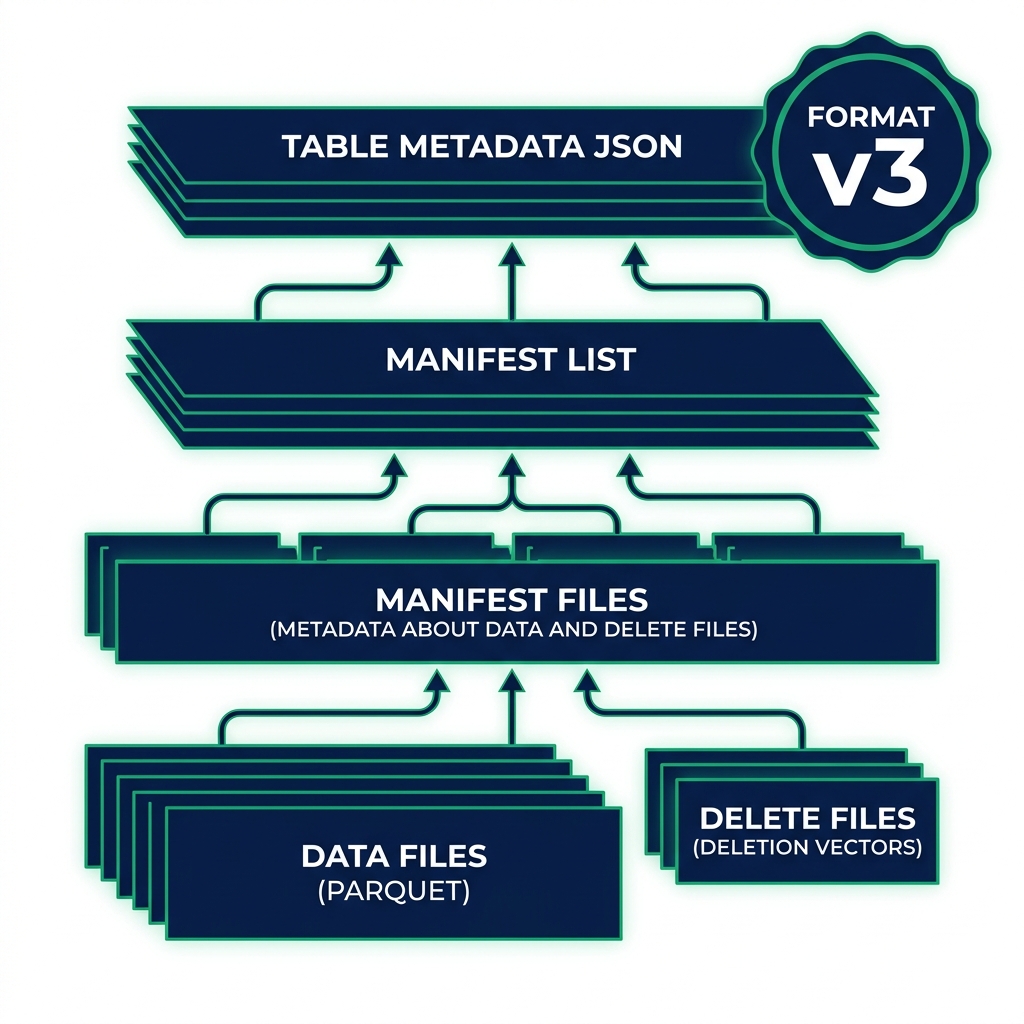
Apache Iceberg v3 became production-ready with the release of Apache Iceberg 1.11.0 on May 19, 2026. The specification had been in development for over a year, and 1.11.0 is the version that locks it in as stable for production workloads. If you run Iceberg tables, you need to understand what changed, what it costs to upgrade, and when to wait.
This guide covers all six major features in Apache Iceberg v3 and walks through the upgrade path, including which engines are ready and what to test before you flip the switch.
What Is Apache Iceberg v3?#
Apache Iceberg uses a format-version property stored in each table's metadata to define which spec features that table uses. Version 1 was the original spec. Version 2 added row-level deletes (merge-on-read) and sequence numbers. Version 3 goes further, adding new data types, encryption, improved deletion performance, and row-level governance.
The format-version is a table-level property, not a cluster-level setting. Different tables in the same catalog can run different format versions. That means you can upgrade incrementally rather than committing your entire lakehouse at once.
You need a v3-capable engine to write to a v3 table. You can still read v3 tables with older engines in some cases, but new v3 features like deletion vectors require an engine that understands the format.
The Six Features That Matter in Apache Iceberg v3#
Binary Deletion Vectors Replace Positional Delete Files#
This is the biggest performance change in v3 for teams doing row-level updates.
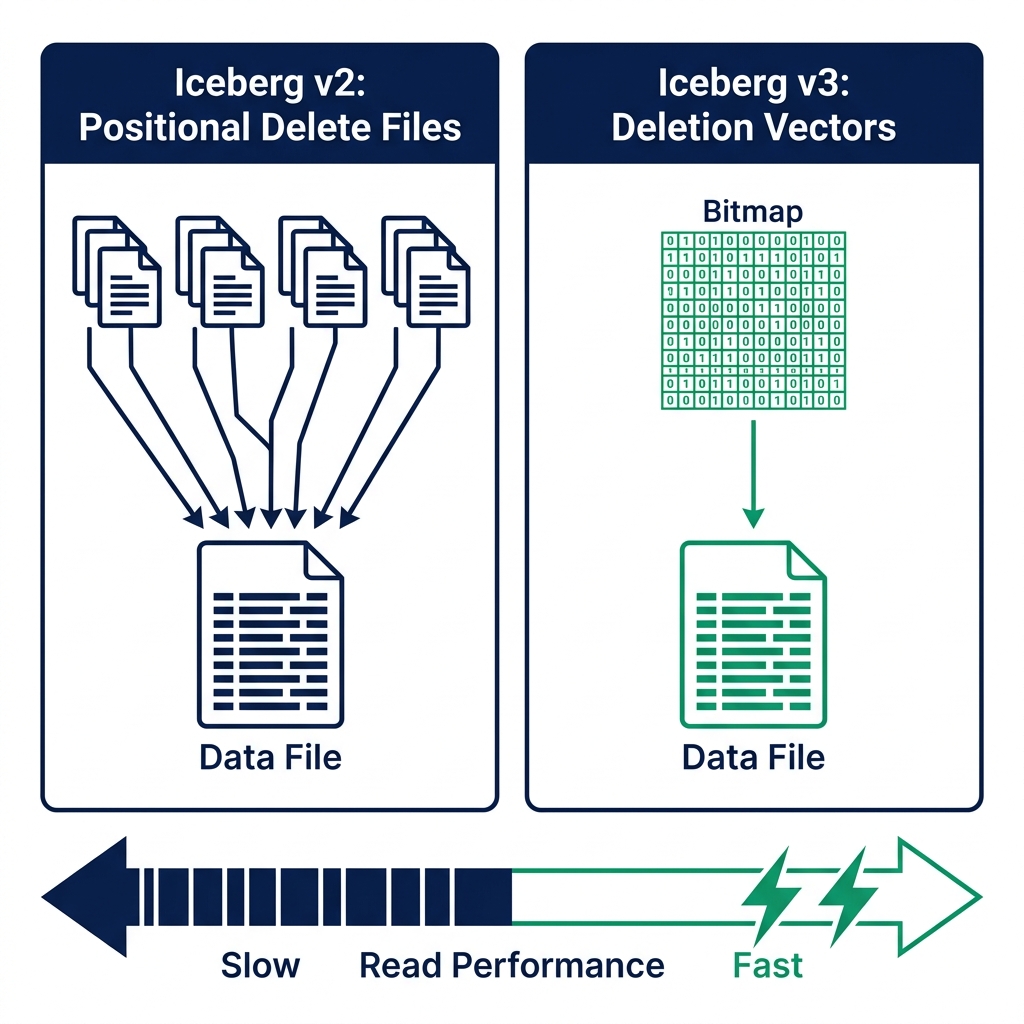
In Iceberg v2, row-level deletes used positional delete files: separate files listing which rows in a data file had been deleted. As a table accumulated many small delete files, the engine had to merge all of them at read time before returning results. On active tables with frequent updates, this merge overhead added up.
Iceberg v3 replaces positional delete files with binary deletion vectors. Instead of a separate file per batch of deletes, the engine maintains a compact bitmap per data file. Each bit position represents a row. A set bit means that row is deleted. Reading the bitmap is an order-of-magnitude faster than merging hundreds of small delete files.
The practical impact: tables with CDC pipelines or frequent UPDATE/DELETE operations read significantly faster after upgrading to v3 and running a compaction pass.
VARIANT, GEOMETRY, and Nanosecond Timestamps#
Iceberg v3 adds three new first-class data types that address gaps in the previous spec.
VARIANT stores semi-structured or JSON data natively without schema flattening. In v1 and v2, teams stored JSON as a string column and parsed it at query time or pre-flattened it into hundreds of typed columns. VARIANT lets the engine store and access nested structures directly, and query engines can push predicates into the nested data. This is particularly useful for event streams, API response logs, and ML feature stores.
GEOMETRY and GEOGRAPHY are first-class spatial types. You can store points, lines, and polygons in Iceberg tables and run spatial joins natively. Before v3, teams stored spatial data as WKT strings and depended on engine-specific extensions for spatial queries.
Nanosecond timestamps (timestamp_ns and timestamptz_ns) meet requirements for high-frequency financial and IoT data. Microsecond precision was sufficient for most workloads, but trading systems and sensor networks generating more than a million events per second need nanosecond fidelity.
Default Column Values Eliminate Backfills#
Adding a new column to a large Iceberg table in v1 and v2 required a choice: leave all historical rows null and handle that downstream, or run a full data rewrite to populate the new column. For tables with terabytes of data, the rewrite was expensive.
Iceberg v3 lets you define a default value for a new column at the schema level. When you run ALTER TABLE ... ADD COLUMN, existing data files stay untouched. The engine reads the default value from table metadata and applies it to rows from old files. The operation completes in seconds, not hours.
This is useful for any team adding metadata columns, rolling out new feature flags, or introducing surrogate keys to existing tables without a maintenance window.
Row Lineage Tracking#
Iceberg v3 formalizes row-level lineage by assigning every row an identity and a modification sequence number. The spec now tracks which operation created or last modified each row and in which snapshot.
For most analytics workloads this runs transparently in the background. Where it pays off is in compliance and auditing. Regulatory reporting often requires demonstrating exactly which rows changed, when, and through which pipeline. With v3 row lineage, that information is part of the table's metadata, not a side-channel audit log that has to be maintained separately.
It also simplifies CDC pipelines. Instead of comparing full row snapshots to detect changes, downstream consumers can read the sequence numbers to identify what changed since the last checkpoint.
Multi-Argument Transforms and Table Encryption#
Two smaller but important additions round out v3.
Multi-argument transforms extend the partitioning and sorting spec to accept multiple input columns. In v1 and v2, each transform operated on a single column. v3 lets you express composite partitioning strategies, such as partitioning by both region and truncated date, without workarounds.
Table encryption keys add built-in support for KMS-backed encryption at the table level. Previous encryption approaches required external tooling or relied on object storage bucket policies. v3 makes encryption a first-class property of the Iceberg table, with per-table keys managed through standard KMS integrations.
How to Plan Your Apache Iceberg v3 Upgrade#
Before running any upgrade command, confirm that every engine writing to the table supports Iceberg v3.
Engine support as of mid-2026:
| Engine | v3 Read | v3 Write |
|---|---|---|
| Apache Spark (with Iceberg 1.11.0) | Yes | Yes |
| Trino | Check your version | Check your version |
| Flink | Partial : verify 1.11.0 support | Partial |
| Dremio | Yes | Yes (via Open Catalog) |
| Snowflake | Interop via REST catalog | Check release notes |
If any engine in your pipeline does not support v3 writes, hold off. A v3 table that a Flink job writes partial records to incorrectly will cause data consistency problems.
The upgrade command itself is simple:
ALTER TABLE my_catalog.my_schema.my_table
SET TBLPROPERTIES ('format-version' = '3');
This is a metadata-only operation. Your existing data files stay in their current format. The engine will write new files in v3 format going forward. Old files remain readable : they just don't use v3 features like deletion vectors for their existing data.
After upgrading, run these validations:
- Confirm the
format-versionproperty reads back as3from your metadata tables. - Run a representative read query and compare results against a pre-upgrade snapshot.
- Execute an UPDATE or DELETE statement and verify the engine writes a deletion vector instead of a positional delete file.
- Check that all engines in your pipeline can still read the table without errors.
When to wait: If your primary query engine hasn't shipped v3 support in a tested release, or if you're running Trino versions below the supported range, wait for the version upgrade first. A failed partial write from an incompatible engine is harder to recover from than simply waiting a release cycle.
What v3 Means for Your Dremio Lakehouse#
Dremio's Open Catalog, built on Apache Polaris, manages Iceberg tables with automatic table optimization. When your tables run v3, Dremio's background compaction jobs will write deletion vectors instead of positional delete files as part of the normal maintenance cycle. You don't need to change your compaction strategy.
The VARIANT type integrates directly with Dremio's AI SQL functions. AI_GENERATE can extract structured schemas from VARIANT columns, letting you run LLM-powered analysis on semi-structured data without first flattening it. That closes a gap that previously required a separate transformation step before AI queries could run.
Row lineage tracking aligns with Dremio's fine-grained access control (FGAC). Compliance teams running on Dremio can combine row-level sequence numbers from the Iceberg metadata with Dremio's audit logs to produce end-to-end data lineage reports. The AI features in Dremio include metadata generation that can annotate VARIANT and spatial columns automatically.
Start with One Table#
Run the format upgrade on a development or staging table first. Pick a table with active UPDATE workloads so you can measure the deletion vector behavior directly. Compare read times before and after, check deletion vector file sizes against your old positional delete files, and confirm your entire engine stack handles the new format cleanly.
After that validation passes, roll the upgrade to production in batches, starting with the tables where deletion vector performance gains matter most.
Try Dremio Cloud free for 30 days and run your Iceberg v3 tables against a production-grade query engine from day one.