Article
Building a Custom Agentic Analytics System: Python, LangChain, and SQL Data Lakes
Cross-posted. This article's canonical home is Data Lakehouse Hub.
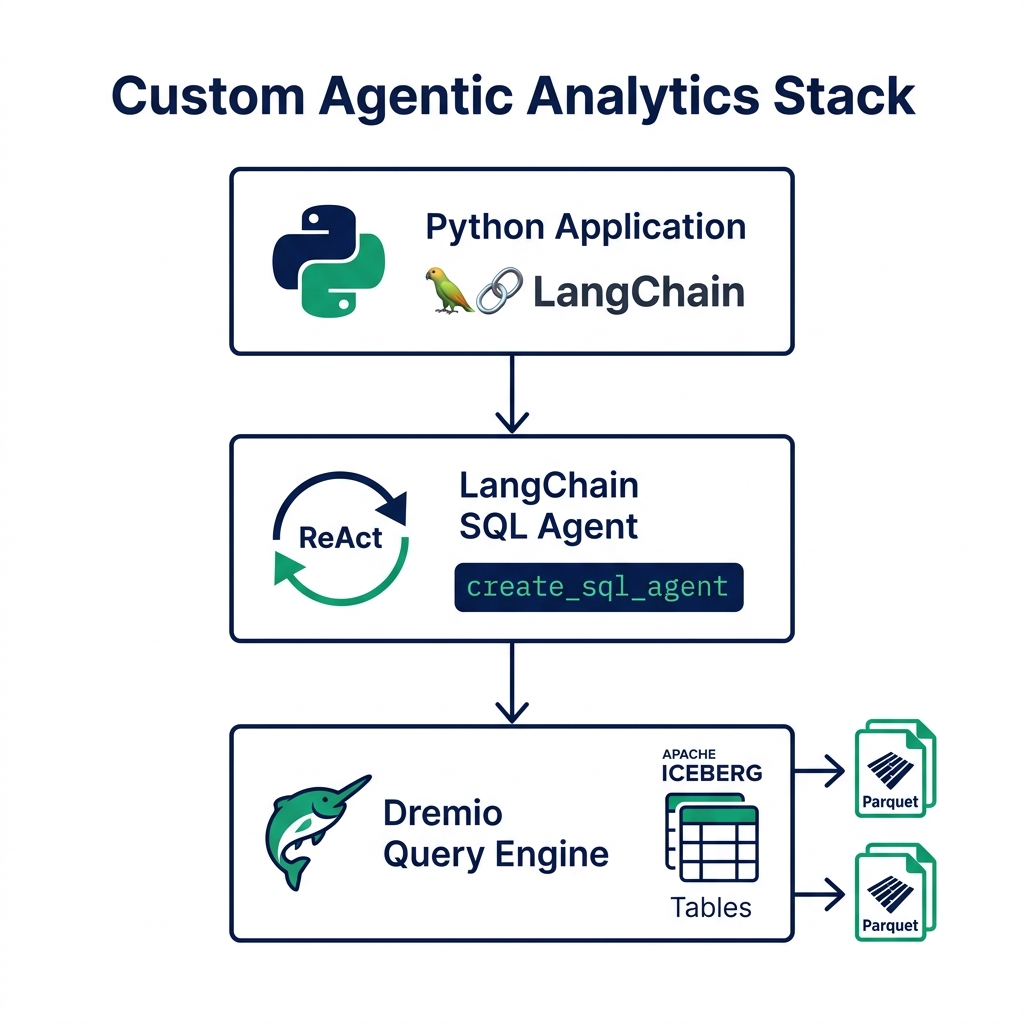
Building your own agentic analytics system is a reasonable choice if you need custom investigation logic, specific tool integrations, or control over how the agent reasons about your schema. The open-source tooling is mature enough in 2026 that you can have a working prototype in an afternoon, and a production-grade system in a few weeks.
This tutorial walks through building a SQL analytics agent using Python, LangChain, and Dremio as the data layer. The agent can explore schemas, write SQL, correct its own errors, and return structured analytical results.
Prerequisites
You'll need Python 3.11+, a Dremio Cloud account (the free trial works), and the following packages:
pip install langchain langchain-openai sqlalchemy pydremio python-dotenvYou'll also need an OpenAI API key for the LLM, and your Dremio connection credentials: host, PAT (personal access token), and the target catalog and schema.
Connecting to Dremio
Dremio exposes a JDBC-compatible SQL interface. LangChain's SQL toolkit wraps SQLAlchemy, which connects to Dremio through the Arrow Flight SQL protocol.
from sqlalchemy import create_engine
from langchain.sql_database import SQLDatabase
import os

DREMIO_HOST = os.getenv("DREMIO_HOST")
DREMIO_TOKEN = os.getenv("DREMIO_TOKEN")

# Dremio JDBC connection string via Arrow Flight SQL
engine = create_engine(
    f"dremio+flight://{DREMIO_HOST}:32010/dremio",
    connect_args={
        "token": DREMIO_TOKEN,
        "disableCertificateVerification": False,
    }
)

db = SQLDatabase(
    engine,
    schema="my_catalog.analytics",  # Limit to specific schema for safety
    include_tables=["orders", "customers", "revenue_daily", "product_catalog"]
)
Limiting include_tables to your relevant tables serves two purposes: it reduces the schema context the agent loads (improving reasoning speed), and it prevents the agent from exploring tables it shouldn't access.
Building the SQL Agent
LangChain's create_sql_agent wraps the ReAct loop with SQL-specific tools: schema inspection, sample query generation, and query execution.
from langchain.agents import create_sql_agent
from langchain.agents.agent_toolkits import SQLDatabaseToolkit
from langchain_openai import ChatOpenAI
from langchain.agents.agent_types import AgentType

llm = ChatOpenAI(
    model="gpt-4o",
    temperature=0,  # Zero temperature for deterministic SQL generation
    openai_api_key=os.getenv("OPENAI_API_KEY")
)

toolkit = SQLDatabaseToolkit(db=db, llm=llm)

agent = create_sql_agent(
    llm=llm,
    toolkit=toolkit,
    agent_type=AgentType.ZERO_SHOT_REACT_DESCRIPTION,
    verbose=True,  # Set to False in production
    max_iterations=15,
    max_execution_time=60,  # Hard timeout in seconds
    handle_parsing_errors=True
)
Setting temperature=0 is important for SQL generation. Higher temperatures introduce randomness that produces creative but often invalid SQL. For schema exploration and analytical reasoning, determinism is preferable.
max_iterations=15 prevents runaway loops. An investigation that hasn't converged in 15 steps likely won't converge at all : either the question can't be answered with available data, or the agent is stuck in an error cycle.
Prompt Configuration for Your Schema
The default LangChain SQL agent prompt gives the LLM generic instructions for SQL databases. For production use, add schema-specific context in the system prompt.
from langchain.prompts import PromptTemplate

SYSTEM_PROMPT = """You are an analytical assistant for Acme Corp.
You have access to the following tables in the analytics schema:

- orders: Transaction records with order_id, customer_id, product_id,
  amount_usd, order_date, status
- customers: Customer master with customer_id, region, segment,
  acquisition_date
- revenue_daily: Pre-aggregated daily revenue by region and product line
- product_catalog: Product metadata with product_id, category,
  unit_cost, launch_date

Important business definitions:
- "Active customer": customer with at least one order in the last 30 days
- "Revenue": sum of amount_usd where status = 'completed'
- "This quarter": current calendar quarter based on order_date

Always verify your results make sense against expected scale.
Monthly revenue should be in the range $2M-$15M.
If a query returns a value outside that range, check your WHERE clause."""

agent = create_sql_agent(
    llm=llm,
    toolkit=toolkit,
    agent_type=AgentType.ZERO_SHOT_REACT_DESCRIPTION,
    prefix=SYSTEM_PROMPT,
    max_iterations=15,
    max_execution_time=60,
    handle_parsing_errors=True
)
The business definitions in the system prompt are critical. Without them, the agent interprets "revenue" using generic SQL patterns and may count cancelled orders or use gross rather than net amounts. The range check ("Monthly revenue should be in $2M-$15M") catches gross calculation errors before they reach the user.
Secure Execution Sandboxes
A SQL agent connected to production data needs guardrails. The most important: read-only access.
Configure your Dremio PAT with SELECT permissions only, on the schemas you've included in the agent. No CREATE, INSERT, UPDATE, or DELETE. This prevents the agent from accidentally modifying data through a malformed write query.
Add a query result size limit:
db = SQLDatabase(
    engine,
    schema="my_catalog.analytics",
    include_tables=["orders", "customers", "revenue_daily", "product_catalog"],
    sample_rows_in_table_info=3,  # Sample rows for context, not full scan
    max_string_length=300  # Truncate long string columns in results
)
For production deployments, log every query the agent executes:
from langchain.callbacks import FileCallbackHandler
import logging

logging.basicConfig(filename="agent_queries.log", level=logging.INFO)

def log_query(query: str, result: str):
    logging.info(f"QUERY: {query}")
    logging.info(f"RESULT_ROWS: {len(result.split(chr(10)))}")

# Add to your agent invocation wrapper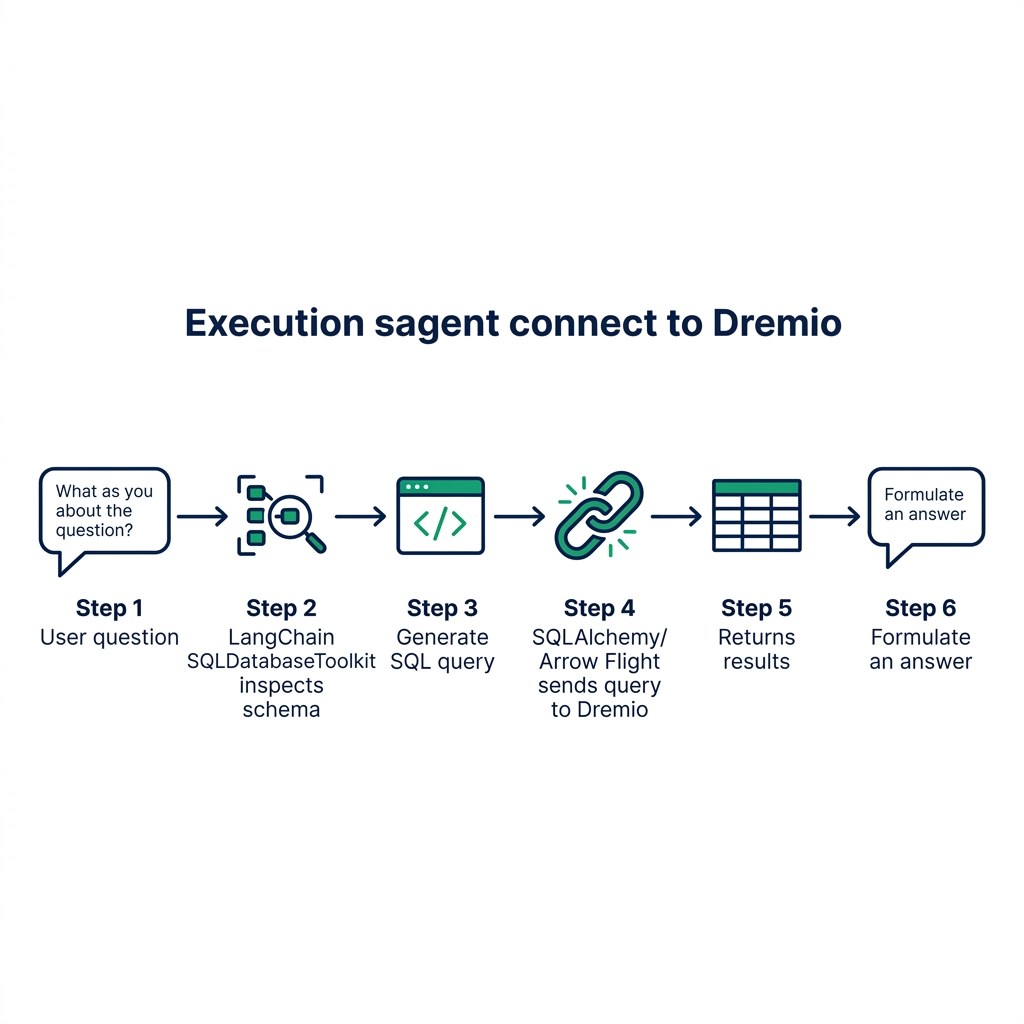
Running Your First Investigation
With the agent configured, run an analytical question:
result = agent.invoke({
    "input": "What were the top 3 product categories by revenue last month, "
             "and how did each compare to the same period last year?"
})

print(result["output"])
The agent will:
- Inspect the available tables
- Write a SQL query joining orders and product_catalog, filtered to last month
- Run the query and read results
- Write a second query for the same period last year
- Compare the results and produce a structured narrative
The full trace (visible with verbose=True) shows every thought, action, and observation. Review the trace during development to understand where the agent makes assumptions and whether those assumptions match your business logic.
What This Approach Doesn't Cover
A Python/LangChain prototype is useful for learning the architecture and testing hypotheses. It's not a production-ready agentic analytics system.
Production systems need: multi-user session isolation, rate limiting per user, more sophisticated error handling than handle_parsing_errors=True, persistent conversation history, and governance-aware tool access that respects your catalog's access control.
Dremio's built-in AI agent handles these requirements. Its built-in AI Agent runs within the platform's governance model, respects the same access controls as human analysts, and logs every query to the audit trail. The Python approach gives you control and customizability; the platform approach gives you governance and production reliability.
Extending the Agent with Custom Tools
The LangChain create_sql_agent function accepts a extra_tools parameter for adding tools beyond the default SQL toolkit. Custom tools let your agent do things the default toolkit can't.
from langchain.tools import Tool
import requests

def get_exchange_rate(currency_pair: str) -> str:
    """Fetch current exchange rate for enriching financial analysis."""
    base, quote = currency_pair.split("/")
    resp = requests.get(f"https://api.exchangerate.host/convert?from={base}&to={quote}")
    rate = resp.json().get("result", "unavailable")
    return f"Current {base}/{quote} rate: {rate}"

exchange_tool = Tool(
    name="get_exchange_rate",
    description="Use when the user asks about revenue in foreign currencies. Input: currency pair like USD/EUR",
    func=get_exchange_rate
)

agent = create_sql_agent(
    llm=llm,
    toolkit=toolkit,
    extra_tools=[exchange_tool],
    max_iterations=15
)
The agent now knows it can convert currencies when analyzing cross-regional revenue. It will use this tool when the investigation requires it and fall back to SQL-only analysis when it doesn't.
This extensibility is where custom agents earn their complexity premium over platform-native solutions. You can add tools that fetch context from your CRM, look up product catalog metadata from a REST API, or retrieve historical benchmark data from a time-series database. The agent reasons about when to use each tool and chains them together in its investigation.
Evaluating Agent Output Quality
Before putting any SQL agent in front of real users, establish a way to measure whether its outputs are correct.
Build a test suite of questions with known correct SQL and expected result ranges:
TEST_CASES = [
    {
        "question": "What was total revenue last month?",
        "expected_sql_contains": ["SUM(amount_usd)", "status = 'completed'"],
        "result_range": (2_000_000, 15_000_000)
    },
    {
        "question": "How many active customers do we have?",
        "expected_sql_contains": ["COUNT", "order_date"],
        "result_range": (10_000, 500_000)
    }
]

def evaluate_agent(agent, test_cases):
    results = []
    for case in test_cases:
        response = agent.invoke({"input": case["question"]})
        results.append({
            "question": case["question"],
            "passed": True  # Implement your validation logic
        })
    return results
Run this evaluation after any schema change, any system prompt update, or any LLM model upgrade. The test suite tells you whether the agent still produces correct outputs for the cases you've verified.
Try Dremio Cloud free for 30 days to compare your custom agent's outputs against the platform's built-in agent on the same data.