Article
Designing an Immutable Data Lakehouse: Best Practices for Iceberg Snapshot Expiration
Iceberg tables accumulate snapshots by design. Every write : every INSERT, UPDATE, DELETE, or compaction, creates a new snapshot. That's how Iceberg provides time travel, rollback, and concurrent reads without locks. It's a good feature, until you never clean it up.
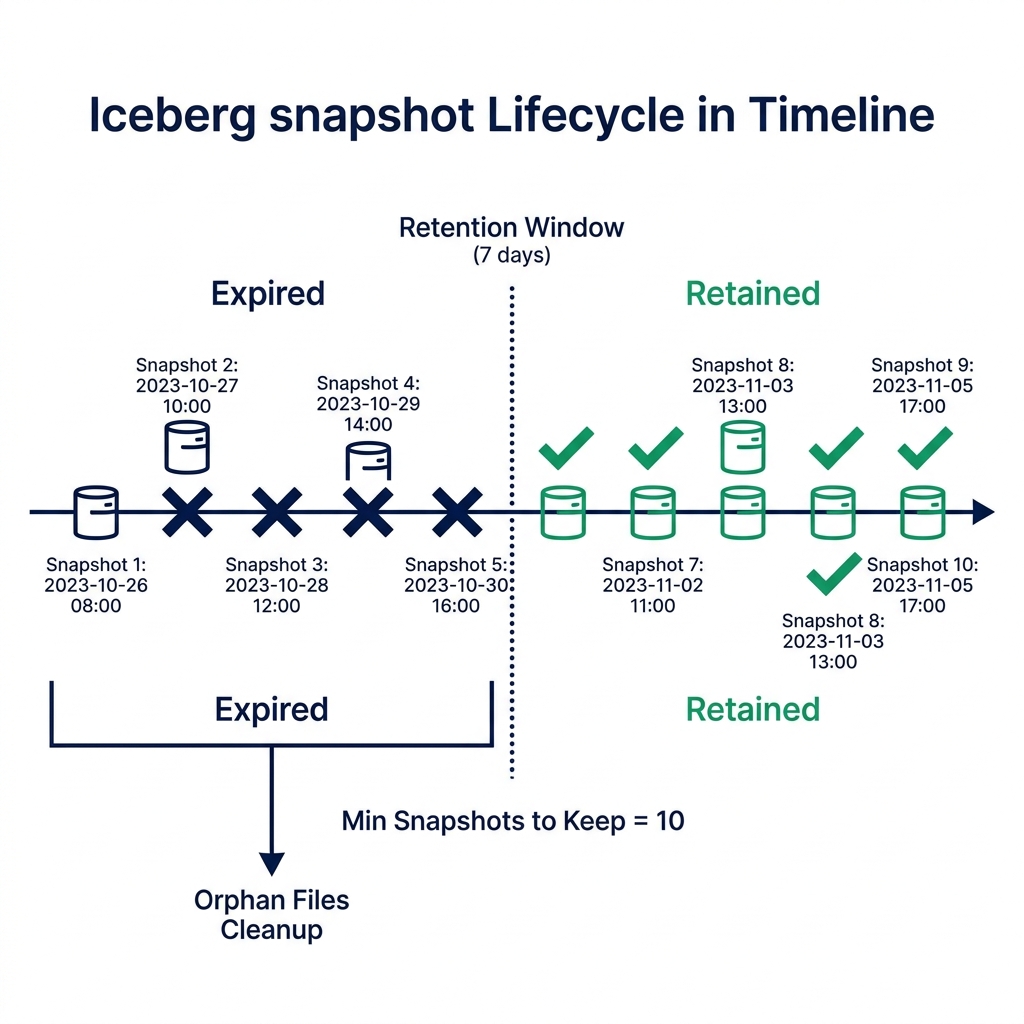
A production Iceberg table that takes 100 writes per day accumulates 36,500 snapshots in a year. Each snapshot points to manifest files, which point to data files. The metadata scan that precedes every query has to process all of that history unless you expire the snapshots that fall outside your retention window.
This guide covers how to design a snapshot expiration policy that keeps tables clean without breaking active queries or compliance requirements.
What Snapshot Accumulation Actually Costs You#
The cost of snapshot accumulation is not storage : it's query planning time.
When a query engine reads an Iceberg table, it starts by reading the metadata: the table metadata JSON, then the manifest list for the current snapshot, then the manifests that list the relevant data files. If your table has thousands of manifests from thousands of historical snapshots, the planner has to navigate that graph even though it only needs the current snapshot's files.
The practical symptom: queries on the same data volume get slower over months as the metadata layer grows. A table that returns results in 2 seconds when first deployed may take 10 seconds a year later, with the same data, the same query, and the same compute.
Storage is a secondary cost. Old snapshot manifests don't compress well and don't share file references efficiently. A table with 12 months of unexpired snapshots typically carries 3–5x the metadata size of a well-maintained table with a 7-day retention window.
Building a Snapshot Retention Policy#
A useful retention policy answers three questions: how old can a snapshot be, how many snapshots do you always keep, and how long do your longest-running queries run?
Time-based expiration sets the maximum age for snapshots. A 7-day window covers most analytical rollback needs. If you need to recover from a bad ETL job that ran 5 days ago, 7 days gives you that option. Going longer increases metadata overhead proportionally.
Count-based floor ensures you always keep a minimum number of recent snapshots regardless of how quickly they were generated. A high-frequency streaming table might generate 1,000 snapshots in a single day. A 7-day window without a count floor would expire all of them by day 8. Setting retainLast = 10 guarantees at least 10 snapshots survive, giving you recent rollback options even during high-write periods.
Query duration safety buffer is the constraint people miss. If a read query starts at timestamp T and a maintenance job expires the snapshot the query is reading at timestamp T+30 minutes, the query fails. Your snapshot retention window must be longer than your longest-running query. If your p99 query takes 4 hours, expire nothing newer than 6 hours ago.
The table properties that enforce these rules:
ALTER TABLE my_catalog.my_schema.my_table
SET TBLPROPERTIES (
  'history.expire.min-snapshots-to-keep' = '10',
  'history.expire.max-snapshot-age-ms' = '604800000'  -- 7 days in ms
);
The Full Maintenance Sequence#
Snapshot expiration is step one of a four-step maintenance sequence. Running them in order matters.
Step 1: Expire Snapshots
Remove snapshot references outside your retention window. This doesn't delete physical files yet : it just removes the metadata pointers.
CALL iceberg.system.expire_snapshots(
  table => 'my_catalog.my_schema.my_table',
  older_than => TIMESTAMP '2026-05-21 00:00:00',
  retain_last => 10
);
Step 2: Remove Orphan Files
After snapshot expiration, some physical data files may no longer be referenced by any remaining snapshot. These are orphan files. Remove them with a safety buffer : the default is 3 days, which prevents deleting files that an active write job just created.
CALL iceberg.system.remove_orphan_files(
  table => 'my_catalog.my_schema.my_table',
  older_than => TIMESTAMP '2026-05-25 00:00:00'
);
Step 3: Rewrite Manifests
As snapshots are added and removed, manifest files fragment. Many manifests end up with only a few file references each. The planner has to open more manifest files to find the same number of data files, which slows scan planning.
CALL iceberg.system.rewrite_manifests(
  table => 'my_catalog.my_schema.my_table'
);
Step 4: Compact Data Files
Small file proliferation : common in streaming ingestion, forces the engine to open thousands of files to scan the same amount of data. Compaction merges them.
CALL iceberg.system.rewrite_data_files(
  table => 'my_catalog.my_schema.my_table',
  options => map('target-file-size-bytes', '134217728')
);
Run all four steps together in a scheduled job, at the frequency your table's write rate requires. High-frequency streaming tables may need nightly maintenance. Batch tables written once a week may only need monthly cleanup.
Monitoring Table Health#
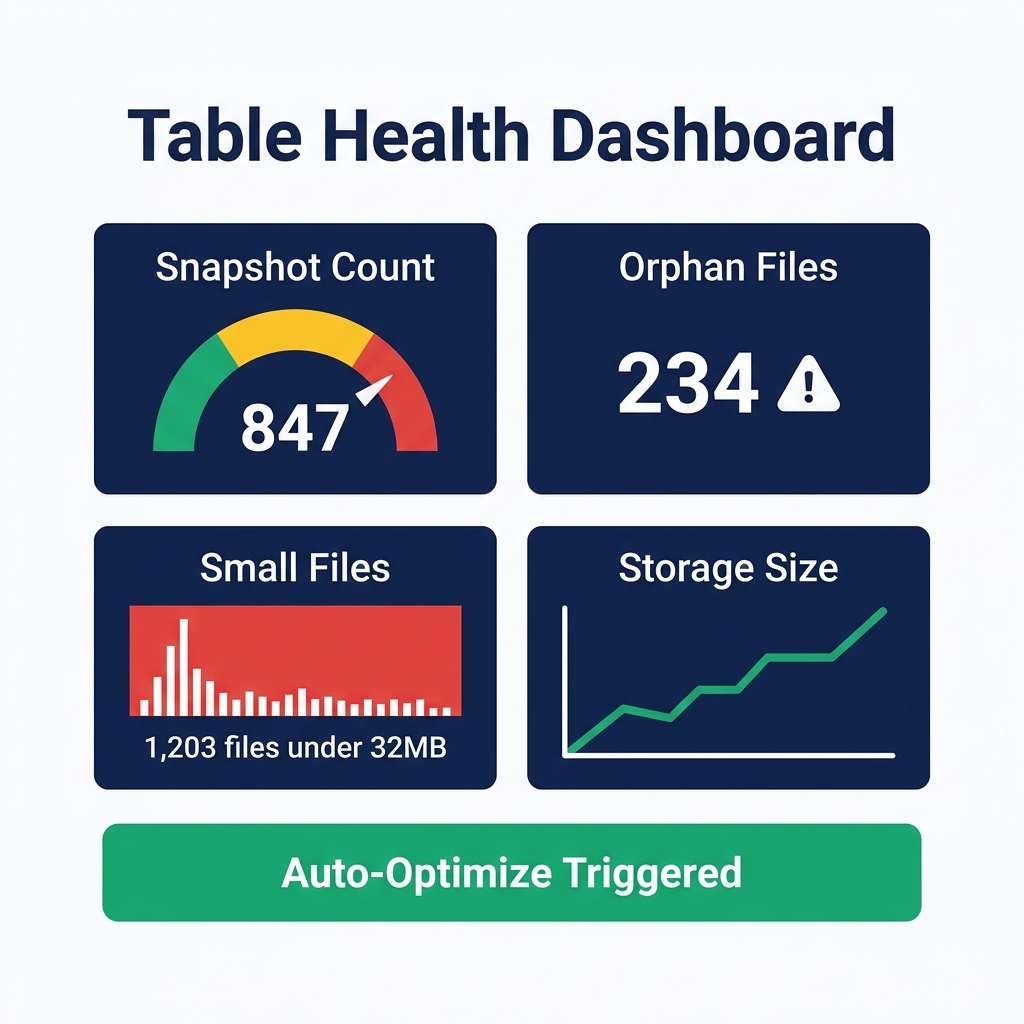
You can check snapshot and manifest counts directly through Iceberg metadata tables. These queries don't require any external monitoring tool : they run in any SQL engine connected to your Iceberg catalog.
-- Check snapshot count
SELECT COUNT(*) AS snapshot_count
FROM my_catalog.my_schema.my_table.snapshots;

-- Check manifest fragmentation
SELECT COUNT(*) AS manifest_count
FROM my_catalog.my_schema.my_table.manifests;

-- Check file size distribution
SELECT
  COUNT(*) AS file_count,
  AVG(file_size_in_bytes) AS avg_file_size,
  MIN(file_size_in_bytes) AS min_file_size,
  MAX(file_size_in_bytes) AS max_file_size
FROM my_catalog.my_schema.my_table.files;
Set an alert if snapshot_count exceeds your expected range, or if avg_file_size drops below 50 MB (a sign of small file accumulation).
Automating Maintenance with Dremio#
Running maintenance manually is unsustainable at scale. Dremio's Automatic Table Optimization runs compaction, manifest rewriting, and orphan file removal as background jobs on tables managed through its Open Catalog. You configure the policy once per table, and the platform handles execution.
For tables outside Dremio's managed catalog, you can run the maintenance procedures above through Dremio's SQL interface as scheduled queries, or orchestrate them through Airflow or similar schedulers.
The tradeoff with external orchestration: you take responsibility for sequencing the steps correctly and monitoring for failures. A maintenance job that crashes halfway through : after expiring snapshots but before removing orphan files, leaves the table in a partially cleaned state. Make sure your orchestrator retries failed steps safely.
Compliance and Retention: Navigating the Conflict#
Snapshot expiration conflicts directly with some compliance frameworks. GDPR's right-to-erasure requirement says user data must be deleted within 30 days of a valid request. If your 90-day time travel window includes records with PII, you can't delete the snapshot that contains them without also deleting your time travel history.
There are two approaches to this conflict:
PII-separate tables: Store PII in a separate Iceberg table with a short retention window (7 days). The main analytical table contains only anonymized or tokenized identifiers. Deletion requests affect only the PII table.
Short retention windows for PII tables: If PII data must co-exist with analytical data in the same table, set your retention window to the minimum that satisfies your operational rollback needs : often 48–72 hours. This means you can process deletion requests within 72 hours and the snapshot containing the deleted record expires within the retention window.
Document your retention decisions in your data catalog. Auditors reviewing your GDPR compliance will want to see that snapshot retention windows were chosen deliberately, with explicit consideration of the deletion timelines they enable.
Scheduling Maintenance Without Impacting Query Performance#
Snapshot expiration and compaction are write operations that temporarily lock table metadata. On a busy table with continuous reads, scheduling maintenance during peak query hours will cause planning delays.
Schedule maintenance jobs during your low-traffic window : typically early morning for business-hours workloads, or midday for overnight batch workloads. For Dremio's Automatic Table Optimization, you can configure the maintenance window per table. The platform respects active queries and queues maintenance work rather than interrupting running reads.
Start with a 7-day retention policy, a count floor of 10, and weekly maintenance runs. Adjust the frequency based on how fast your snapshot_count and manifest_count metrics grow.
Try Dremio Cloud free for 30 days to run Iceberg tables with automated maintenance built in.