A 2026 Introduction to Apache Iceberg
Apache Iceberg is an open-source table format for large analytic datasets. It defines how data files stored on object storage (S3, ADLS, GCS) are organized into a logical table with a schema, partition layout, and consistent point-in-time snapshots. If you've heard the term "data lakehouse," Iceberg is the layer that makes it possible by bringing warehouse-grade reliability to data lake storage.
This post covers what Iceberg is, how its metadata works under the hood, what changed across specification versions 1 through 3, what's being proposed for v4, and how to get started using Iceberg tables with Dremio in about ten minutes.
Where Iceberg Came From
Before Iceberg, most data lake tables used the Hive table format. Hive tracks data by directory paths: one directory per partition, with files inside. That works fine for small tables, but it breaks down at scale. Listing files across thousands of partition directories takes minutes. Schema changes require careful coordination. There's no isolation between readers and writers, so concurrent queries can return inconsistent results.
Netflix hit all of these problems in production around 2017. Ryan Blue and Dan Weeks designed Iceberg to solve them by tracking individual files instead of directories, using file-level metadata instead of a central metastore, and requiring atomic commits for every change. Netflix open-sourced the project, and it entered the Apache Incubator in 2018. By May 2020, Iceberg graduated to an Apache Top-Level Project. Today it's the de facto open table format, adopted by AWS, Google, Snowflake, Databricks, Dremio, Cloudera, and dozens of other vendors.
How Iceberg's Metadata Works
Iceberg replaces directory listings with a tree of metadata files. Each layer in the tree stores progressively finer details about the table's contents.
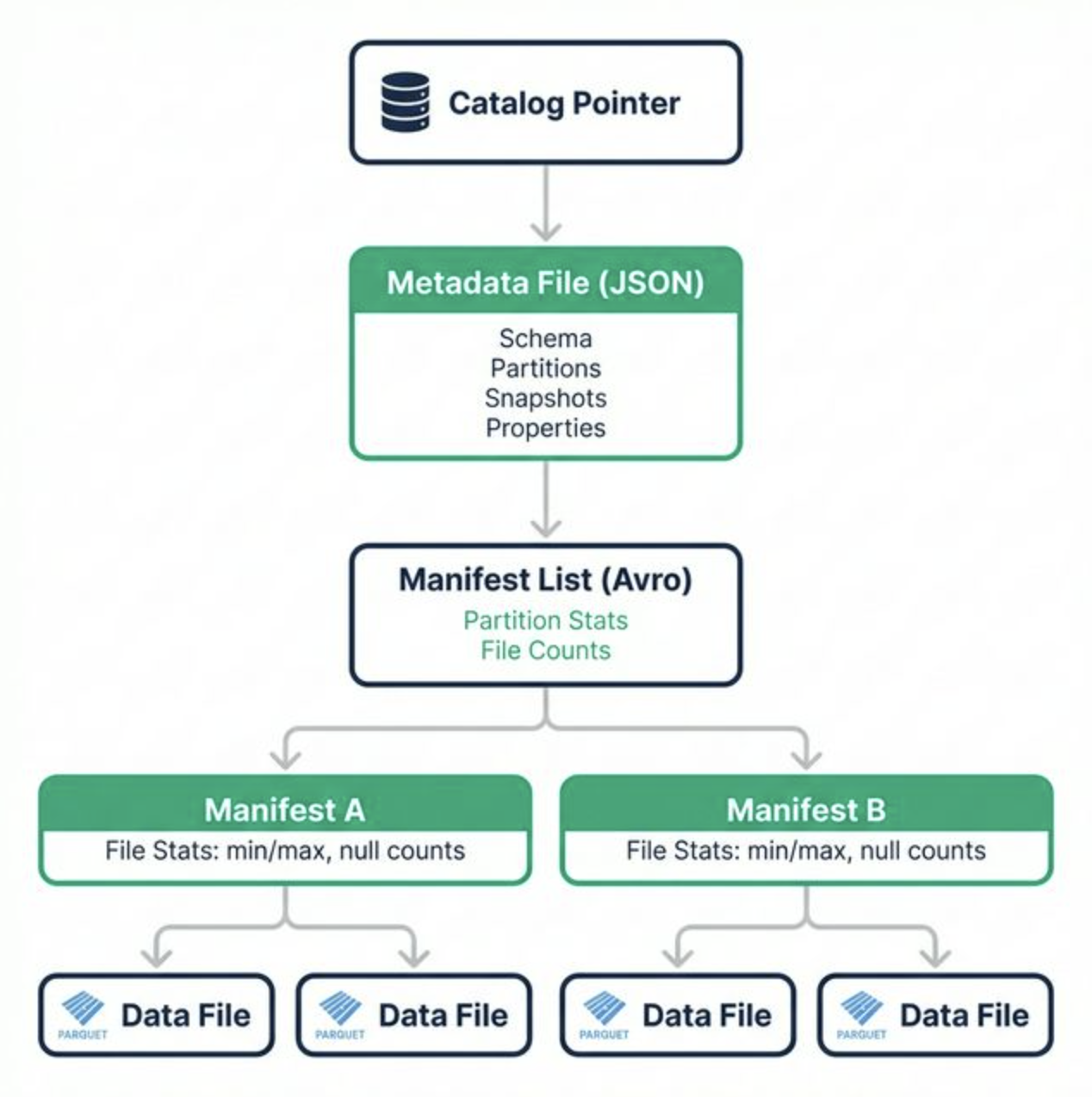
Catalog Pointer: The catalog (Polaris, Glue, Nessie, or any REST catalog implementation) stores a single pointer to the current metadata file. This is the entry point.
Metadata File (JSON): Contains the current schema, partition specs, sort orders, snapshot list, and table properties. Every write creates a new metadata file and atomically swaps the catalog pointer.
Manifest List (Avro): One per snapshot. Lists all manifest files belonging to that snapshot, along with partition-level summary stats. Query engines use these stats to skip entire manifests that can't match a query's filter.
Manifest Files (Avro): Each manifest tracks a set of data files and stores per-file statistics: file path, partition tuple, record count, and column-level min, max, and null counts. These stats enable file-level pruning during scan planning.
Data Files (Parquet/ORC/Avro): The actual rows, stored in columnar format. Iceberg itself is format-agnostic, though Parquet is the most common choice.
This structure means scan planning is O(1) in metadata lookups rather than O(n) in partition directories. That's the core architectural advantage.
Spec Versions: V1 Through V3 (and V4 Proposals)
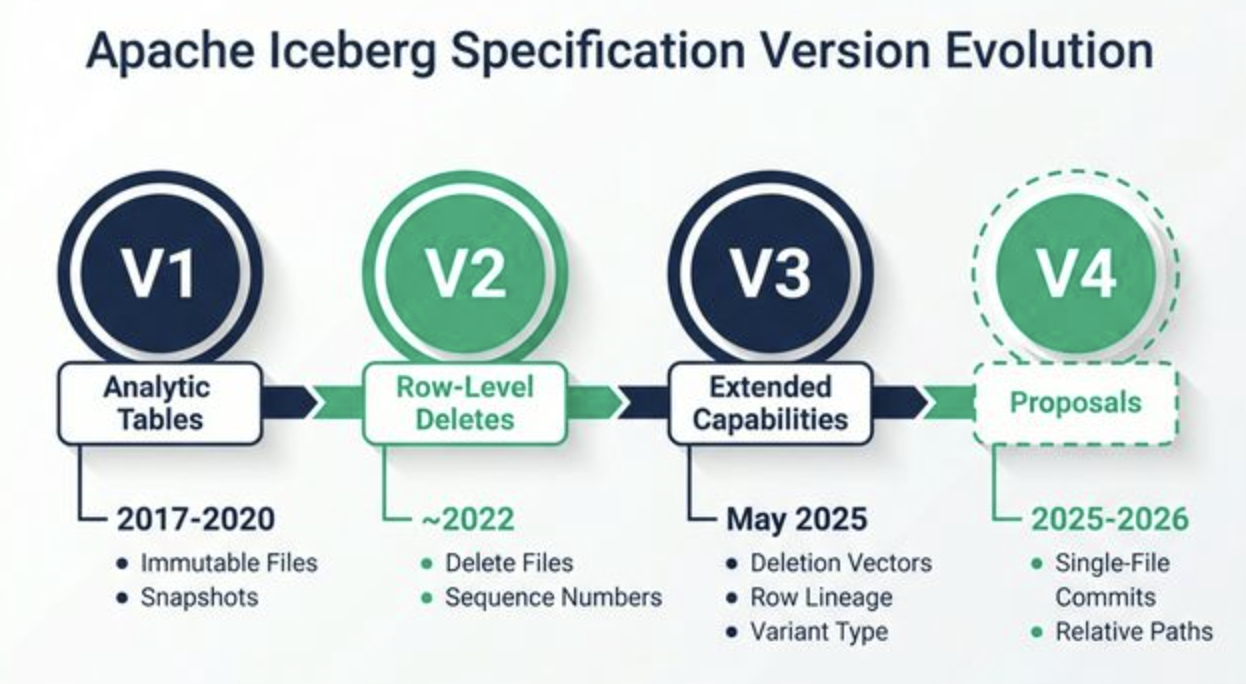
Version 1: Analytic Tables (2017–2020)
V1 established the fundamentals: immutable data files, snapshot-based tracking, manifest-level file stats, hidden partitioning, and schema evolution via unique column IDs. Operations were limited to appends and full-partition overwrites.
Version 2: Row-Level Deletes (~2022)
V2 added delete files that encode which rows to remove from existing data files. Position delete files list specific (file, row-number) pairs. Equality delete files specify column values that identify deleted rows. This made UPDATE, DELETE, and MERGE possible without rewriting entire data files. V2 also introduced sequence numbers for ordering concurrent writes and resolving commit conflicts through optimistic concurrency.
Version 3: Extended Capabilities (May 2025)
V3 brought several major additions:
- Deletion Vectors: Binary bitmaps stored in Puffin files that replace position deletes. More compact in storage and faster to apply during reads. At most one deletion vector per data file.
- Row Lineage: Per-snapshot tracking of row-level identity (
first-row-id,added-rows). This enables efficient change data capture (CDC) pipelines directly on Iceberg tables. - New Data Types:
variantfor semi-structured data,geometryandgeographyfor geospatial workloads, and nanosecond-precision timestamps (timestamp_ns,timestamptz_ns). - Default Values: Columns can specify
write-defaultandinitial-defaultvalues, making schema evolution smoother. - Multi-Argument Transforms: Partition and sort transforms can accept multiple input columns.
- Table Encryption Keys: Built-in support for encrypting data at rest.
Version 4: Active Proposals (2025–2026)
The community is actively discussing several changes for a future v4 spec:
- Single-file commits would consolidate all metadata changes into one file per commit, reducing I/O overhead for high-write workloads.
- Parquet for metadata would replace Avro-encoded metadata files with Parquet, enabling columnar reads of metadata (only load the fields you need).
- Relative path support would store file references relative to the table root, simplifying table migration and replication without metadata rewrites.
- Improved column statistics would add more granular stats for better query planning and change detection.
Key Features Worth Knowing
- ACID Transactions: Every commit is atomic with serializable isolation. Readers never see partial writes.
- Schema Evolution: Add, drop, rename, or reorder columns safely. Iceberg uses unique field IDs, so renaming a column doesn't break older data files.
- Partition Evolution: Change your partitioning strategy without rewriting existing data. Old and new partition layouts coexist. Queries filter on data values, not partition columns.
- Hidden Partitioning: Users query raw values (
WHERE order_date = '2025-06-15'). Iceberg applies transforms (month,day,bucket,truncate) automatically. No synthetic partition columns in the schema. - Time Travel: Query any previous snapshot by ID or timestamp. Roll back to a known-good state in one command.
- Branching and Tagging: Named references to specific snapshots, useful for write-audit-publish workflows and staging environments.
- Multi-Engine Access: The same Iceberg table is readable and writable from Spark, Flink, Trino, Dremio, DuckDB, Snowflake, BigQuery, Presto, and others.
The Value of the REST Catalog Spec
Iceberg's REST Catalog Specification defines an HTTP API for table management. Any engine that speaks HTTP can create, list, read, and commit to Iceberg tables without importing a Java SDK. That's significant because it makes catalog access language-agnostic (Python, Rust, Go, JavaScript) and cloud-agnostic (AWS, GCP, Azure). It also enables server-side features like credential vending (short-lived storage tokens per request), commit deconfliction, and multi-table transactions.
Several projects implement the REST Catalog spec: Apache Polaris, Project Nessie, Unity Catalog, AWS Glue (via adapter), and Snowflake Open Catalog. This means you can pick a catalog implementation without locking in your query engines. Every engine points at the same REST endpoint.
Getting Started: Apache Iceberg on Dremio
You can get hands-on with Iceberg tables right now using Dremio Cloud. Here's the quick path:
1. Sign up at dremio.com/get-started. You'll get a free 30-day trial. Dremio creates a lakehouse project and an Open Catalog (powered by Apache Polaris) automatically at signup.
2. Create an Iceberg table and insert data:
CREATE FOLDER IF NOT EXISTS db;
CREATE FOLDER IF NOT EXISTS db.schema;

CREATE TABLE db.schema.sales (
  order_id INT,
  customer_name VARCHAR,
  product VARCHAR,
  quantity INT,
  order_date DATE,
  total_amount DECIMAL(10,2)
) PARTITION BY (MONTH(order_date));

INSERT INTO db.schema.sales VALUES
  (1, 'Alice Chen', 'Widget A', 10, '2025-01-15', 150.00),
  (2, 'Bob Smith', 'Widget B', 5, '2025-01-20', 75.00),
  (3, 'Carol Davis', 'Widget A', 8, '2025-02-10', 120.00);
Notice the PARTITION BY (MONTH(order_date)). That's hidden partitioning in action. You query order_date directly; Iceberg handles the partitioning.
3. Query the metadata tables. Dremio exposes Iceberg's metadata through TABLE() functions. These let you inspect the internal state of your table without touching the raw metadata files:
-- View all snapshots (who committed what and when)
SELECT * FROM TABLE(table_snapshot('db.schema.sales'));

-- View commit history
SELECT * FROM TABLE(table_history('db.schema.sales'));

-- View manifest file details
SELECT * FROM TABLE(table_manifests('db.schema.sales'));

-- View partition statistics
SELECT * FROM TABLE(table_partitions('db.schema.sales'));
The table_snapshot query shows each snapshot ID, timestamp, and the operation that created it (append, overwrite, delete). The table_manifests query reveals how many data files and delete files exist in each manifest. Run these after each INSERT or DELETE to see how Iceberg tracks changes internally.
Go Deeper
This post covers the essentials, but Iceberg's spec and ecosystem run deep. If you want the full picture, three books cover the subject end to end:
- Apache Iceberg: The Definitive Guide (O'Reilly) by Tomer Shiran, Jason Hughes, and Alex Merced. Free download from Dremio.
- Apache Polaris: The Definitive Guide (O'Reilly) by Alex Merced, Andrew Madson, and Tomer Shiran. Free download from Dremio.
- Architecting an Apache Iceberg Lakehouse (Manning) by Alex Merced. A hands-on guide to designing modular lakehouse architectures with Spark, Flink, Dremio, and Polaris.
Between these three resources and a free Dremio Cloud trial, you'll have everything you need to build on Apache Iceberg in production.
Join the Dremio Developer Community Slack Community to learn more about Apache Iceberg, Data Lakehouses and Agentic Analytics.